
When building customer and team-centric applications, keeping your identity platform and CRM system in sync is crucial. Clerk provides powerful webhooks and APIs to handle events like user creation, organization membership updates, and organization lifecycle management. With Salesforce Apex, you can capture these events and translate them into Contacts and Accounts, ensuring real-time synchronization between Clerk and Salesforce.
In this blog, we’ll cover four key pieces of this integration:
- user.created event
- organizationMembership.created
- organizationMembership.deleted
- Create Organization API
1. Handling the user.created Event
What It Is
Triggered whenever a new user is registered in Clerk.
Why It Matters
In Salesforce, you can use this to automatically create a Contact record.
Example Use Case A new employee signs up. Salesforce automatically creates a Contact with the employee’s details.
2. Handling the organizationMembership.created Event
What It Is
Fired whenever a user joins an organization in Clerk.
Why It Matters
Organizations in Clerk map naturally to Accounts in Salesforce. This event ensures Contacts are linked to the right Accounts.
Example Use Case A new hire joins “Acme Inc.” in Clerk. Salesforce links their Contact to the Acme Inc. Account.
3. Handling the organizationMembership.deleted Event
What It Is
Triggered when a user is removed from an organization in Clerk.
Why It Matters
Prevents Salesforce from showing outdated relationships by unlinking or marking the Contact as inactive.
Example Use Case
A contractor leaves “Acme Inc.” in Clerk. Salesforce removes their Account association, keeping data accurate.
Code Implemetation:
WebHookHandler.apxc@RestResource(urlMapping='/api/invokeWebhook/*') /*Rest Resource Endpoint*/
global class WebHookHandler {

    @HttpPost
    global static String handlePost(){
        RestRequest requestContext = RestContext.request;
        RestResponse responseContext = RestContext.response;
        String requestBody = requestContext.requestBody.toString();

        Map<String, Object> payload = (Map<String, Object>) JSON.deserializeUntyped(requestBody);
        String eventType = (String) payload.get('type');

        Map<String, Object> data = (Map<String, Object>) payload.get('data');
        String firstName = data.containsKey('first_name') ? (String) data.get('first_name') : null;
        String lastName = data.containsKey('last_name') ? (String) data.get('last_name') : null;
        List<Object> emailAddresses = (List<Object>) data.get('email_addresses');

        String firstEmail = '';
        if (emailAddresses != null && !emailAddresses.isEmpty()) {
            Map<String, Object> firstEmailObj = (Map<String, Object>) emailAddresses[0];
            firstEmail = firstEmailObj.containsKey('email_address') ? (String) firstEmailObj.get('email_address') : null;
        }

        String clerkUserId = '';
        if(eventType == 'user.created') {
            clerkUserId = data.containsKey('id') ? (String) data.get('id') : null;
        }
        else if(eventType == 'organizationMembership.created') {
            Map<String, Object> userData = (Map<String, Object>) data.get('public_user_data');
            clerkUserId = userData.containsKey('user_id') ? (String) userData.get('user_id') : null;
        }
        else if(eventType == 'organizationMembership.deleted') {
            Map<String, Object> userData = (Map<String, Object>) data.get('public_user_data');
            clerkUserId = userData.containsKey('user_id') ? (String) userData.get('user_id') : null;
        }

        ClerkApi.getUserOrganizationMemberships(clerkUserId, eventType, firstName, lastName, firstEmail);
        return 'invokeWebhook invoked successfully';
    }
}
ClerkApi Class:
ClerkApi.apxcglobal with sharing class ClerkApi {

    private static final String CLERK_API_BASE = 'https://api.clerk.com/v1';
    private static final String API_KEY = ''; // Add you API key here..
    public static List<String> orgIds;

    @future(callout=true)
    global static void getUserOrganizationMemberships(String clerkUserId, String eventType, String firstName, String lastName, String emailAddresse) {
        Http http = new Http();
        HttpRequest request = new HttpRequest();
        String endpoint = CLERK_API_BASE + '/users/' + clerkUserId + '/organization_memberships';
        request.setEndpoint(endpoint);
        request.setMethod('GET');
        request.setHeader('Authorization', 'Bearer ' + API_KEY);
        request.setHeader('Content-Type', 'application/json');
        HttpResponse response = http.send(request);

        if (response.getStatusCode() == 200) {
            Map<String, Object> jsonResponse = (Map<String, Object>) JSON.deserializeUntyped(response.getBody());
            List<Object> memberships = (List<Object>) jsonResponse.get('data');

            if (memberships != null) {
                if (eventType == 'user.created') {
                    for (Object membershipObj : memberships) {
                        Map<String, Object> membership = (Map<String, Object>) membershipObj;
                        Map<String, Object> organization = (Map<String, Object>) membership.get('organization');
                        if (organization != null && organization.containsKey('id')) {
                            String orgId = (String) organization.get('id');
                            orgIds.add(orgId);
                        }
                    }
                    System.debug('orgIds: '+orgIds);
                }
                else if(eventType == 'organizationMembership.created') {
                    System.debug('organizationMembership.created: '+clerkUserId);
                }
                else if(eventType == 'organizationMembership.deleted') {
                    System.debug('organizationMembership.deleted: '+clerkUserId);
                }
            } else {
                System.debug('Memberships data is null');
            }
        } else {
            System.debug('Clerk API returned error status: ' + response.getStatusCode() + ' ' + response.getBody());
        }
    }
}
Results
when user.created event fired:
Create a user in the Clerk, you received the debug log in the Salesforce.
when organizationMembership.created:
Add any user in the Organization in Clerk, you received the debug log in the Salesforce.
when organizationMembership.deleted event fired:
Remove any user in the Organization in Clerk, you received the debug log in the Salesforce.
4. Creating Organizations via the Clerk API
What It Is
The Clerk Create Organization API (POST /v1/organizations) allows you to create new organizations programmatically.
Why It Matters
This API ensures that every business entity your platform supports exists in Clerk and can be synchronized with Salesforce Accounts.
Apex Example
createOrganization.apxcpublic static void createOrganization(String name) {
    Http http = new Http();
    HttpRequest request = new HttpRequest();
    request.setEndpoint('https://api.clerk.com/v1/organizations');
    request.setMethod('POST');
    request.setHeader('Authorization', 'Bearer ' + API_KEY);
    request.setHeader('Content-Type', 'application/json');

    Map<String, Object> body = new Map<String, Object>();
    body.put('name', name);

    request.setBody(JSON.serialize(body));

    HttpResponse response = http.send(request);
    if (response.getStatusCode() == 200 || response.getStatusCode() == 201) {
        Map<String, Object> result = (Map<String, Object>) JSON.deserializeUntyped(response.getBody());
        String orgId = (String) result.get('id');
        System.debug('Organization created. OrgId: ' + orgId);
    } else {
        System.debug('Failed to create organization. Status: ' + response.getStatus() +
                     ' Response: ' + response.getBody());
        throw new CalloutException('Failed to create organization. Status: ' + response.getStatus());
    }
}
Results
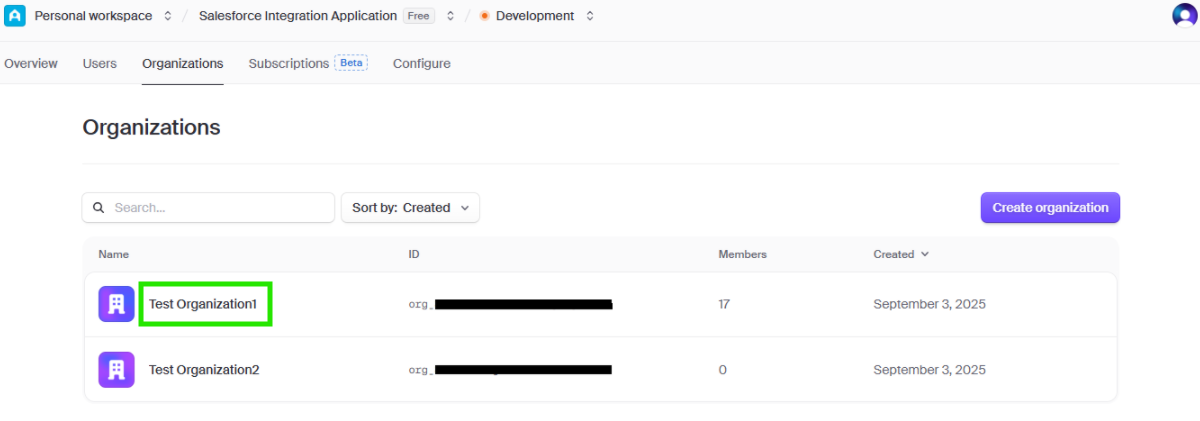
Execute this below apex code from the anonymous window:
ClerkApi.createOrganization('Test Organization');
You able to see that the Test Organizatin is created successfully in the clerk:
Example Use Case
A new company “TechWorld Inc.” signs up. Clerk API creates an Organization for them. Users can now be assigned as members (organizationMembership.created).
Architecture Overview
Here’s how all the pieces fit together: Clerk events fire → user.created, organizationMembership.created, organizationMembership.deleted. Salesforce webhook endpoint (WebHookHandler.cls) receives payloads. ClerkApi.cls handles API calls like createOrganization. Salesforce DML operations create or update Contacts and Accounts.
This architecture ensures bi-directional sync between Clerk’s identity model and Salesforce’s CRM model.
Final Thoughts By combining Clerk events (user.created, organizationMembership.created, organizationMembership.deleted) with the Create Organization API, you build a robust end-to-end identity-to-CRM pipeline.
Users in Clerk → Contacts in Salesforce Organizations in Clerk → Accounts in Salesforce Membership events → Contact–Account relationships kept in sync API calls → Programmatic control for creating and managing organizations
Summary
With this integration in place, your Salesforce instance will always reflect the latest identity data from Clerk, eliminating manual updates and ensuring your teams work with real-time, reliable data.