
- 📍 Location: USA
- 🏭 Industry: Tech
- 💼 Domain: Health
Challenge
A growing B2B organization was using HubSpot as its primary CRM for marketing and early stage sales activities. As the sales team expanded, the company decided to migrate to Salesforce to support more advanced sales processes, reporting capabilities, and long-term scalability. However, migrating historical CRM data presented several challenges. HubSpot and Salesforce follow very different data models, which made direct migration complex. Key challenges included:
-
Different CRM Data Models HubSpot does not use a native Account object and instead stores company data in the Company object, while Salesforce uses Accounts to represent organizations.
-
Contact Structure Differences In HubSpot, contacts can represent both leads and customers, whereas Salesforce separates them into Leads, Contacts, and Accounts.
-
Duplicate Record Risks Existing duplicate rules in Salesforce could block imports and risk creating duplicate Leads and Contacts.
-
Relationship Preservation Historical relationships between companies and contacts needed to be maintained during migration.
Future Integration Requirements HubSpot record IDs needed to be preserved to allow future integrations or synchronization if required.
The client required a structured migration strategy that would ensure clean data, prevent duplicates, and align with Salesforce best practices.
Solution
Phenoble Software designed and executed a structured three phase CRM migration strategy to ensure a smooth transition from HubSpot to Salesforce while preserving data integrity and relationships. Our approach focused on maintaining a clean Salesforce data model, preventing duplicates, and preserving historical references.
Data Architecture Principles Implemented
Phenoble Software implemented the migration based on key CRM data governance principles:
- Each individual must exist as either a Lead or a Contact, never both
- Salesforce system fields must remain unchanged
- External ID fields must be used to prevent duplicates
- Data imports must follow the correct object dependency order
Phase 1: Account Migration
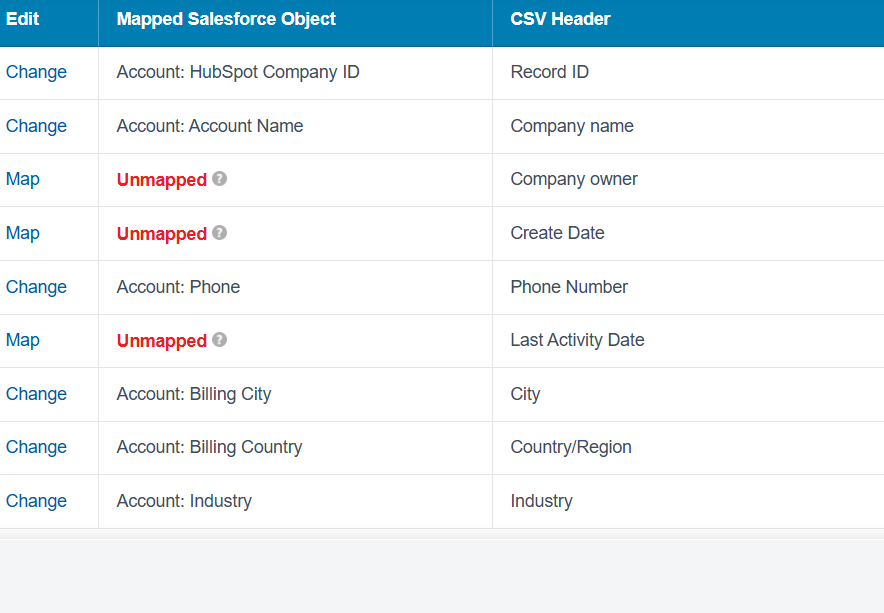
Phenoble Software migrated HubSpot Companies into Salesforce Accounts. Approach
- HubSpot Company records were mapped to Salesforce Accounts.
- A custom External ID field was created to store HubSpot Company IDs.
- Salesforce system-generated fields were excluded from imports.
Outcome
- All company records migrated successfully.
- A clean Account structure was established to support future relationships.
Phase 2: Contact Migration
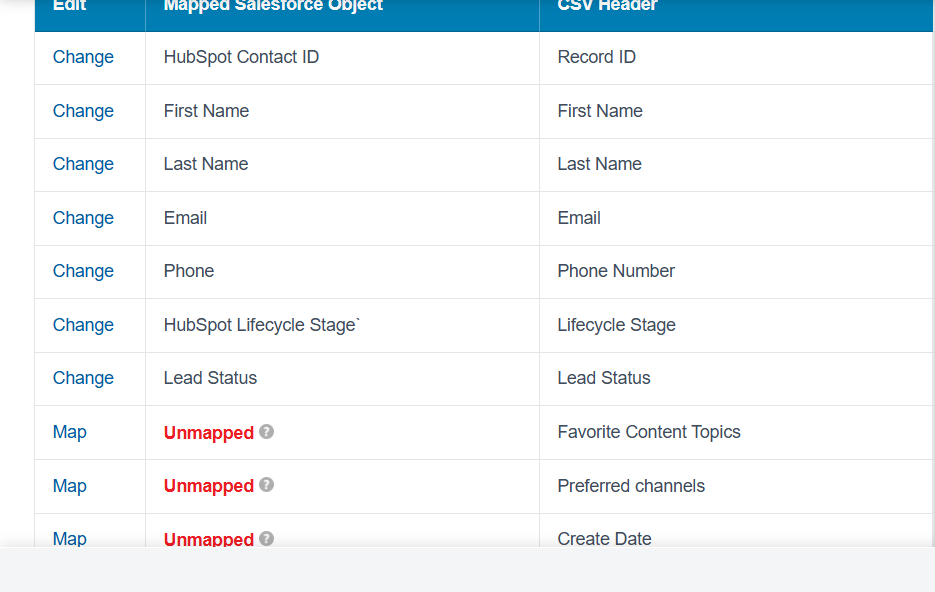
HubSpot Contacts representing existing customers were migrated as Salesforce Contacts.
Approach
-
Contacts were linked to Accounts using company relationships.
-
HubSpot Contact IDs were stored in Salesforce as External IDs.
-
Duplicate prevention was handled using Upsert logic. Outcome
-
Contacts were accurately associated with their respective Accounts.
-
No duplicate contacts were created.
-
HubSpot historical references were preserved.
Phase 3: Lead Migration Critical Decision
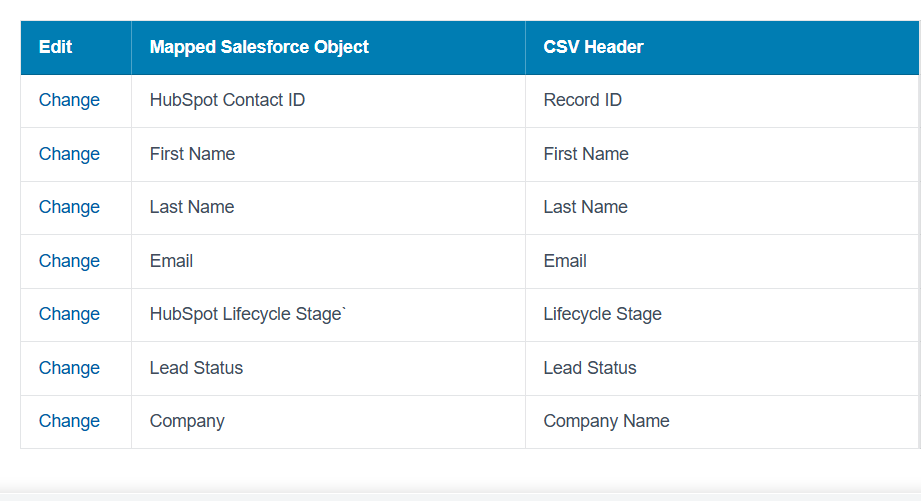
Phenoble Software migrated remaining HubSpot contacts as Salesforce Leads.
Approach
- Leads were imported only for individuals who did not already exist as Contacts.
- HubSpot lifecycle stages were stored separately from Salesforce Lead Status.
- Duplicate rules were respected during import.
Outcome
- A clean lead pipeline was established in Salesforce.
- No Lead–Contact duplication occurred.
- Sales teams could continue standard lead conversion processes.
Duplicate Management Strategy
To ensure high data quality during migration:
-
Custom External ID fields were created on:
- Accounts
- Contacts
- Leads
-
Salesforce imports were executed using Upsert mode (Add & Update).
-
Duplicate rules were temporarily relaxed during migration and re-enabled afterward.
This ensured a controlled and error-free migration process.
Results
✔ Successfully migrated complete historical data from HubSpot to Salesforce
✔ Preserved company-contact relationships and HubSpot record references
✔ Zero duplicate Accounts, Contacts, or Leads created
✔ Clean Salesforce data structure aligned with best practices
✔ Sales team transitioned to Salesforce without operational disruption
✔ Established a scalable CRM foundation for future growth
Business Impact
-
Faster Salesforce Adoption
- Sales teams were able to transition quickly without disruptions to their workflow.
-
Reliable Reporting and Forecasting
- Cleanly structured Salesforce data enabled accurate reporting and pipeline visibility.
-
Improved Data Integrity
- External ID mapping and controlled migration eliminated duplicate records.
-
Scalable CRM Foundation
- The new Salesforce architecture supports future integrations and business growth.
-
Reduced Data Maintenance Effort
- Well-structured data significantly reduced long-term administrative overhead.
Tech Stack
-
Technology
-
Salesforce CRM
-
Salesforce Data Import Wizard / Data Loader
-
External ID Mapping
-
Data Migration Strategy & CRM Data Architecture
-
-
Cloud
- Salesforce Sales Cloud
-
Tools used
- HubSpot CRM
- Salesforce Data Loader
- VS Code
- Workbench